4 minutes
Retry a failed payment through a different Payment Gateway
If you have attempted to pay members of your organization (For information on how to pay your members, please click here), but it results in a failed payment, and you wish to attempt payment through a different payment gateway, please follow this guide.
Step 1
Click on the Financials tab on the left sidebar and then select Payment records.
Step 2
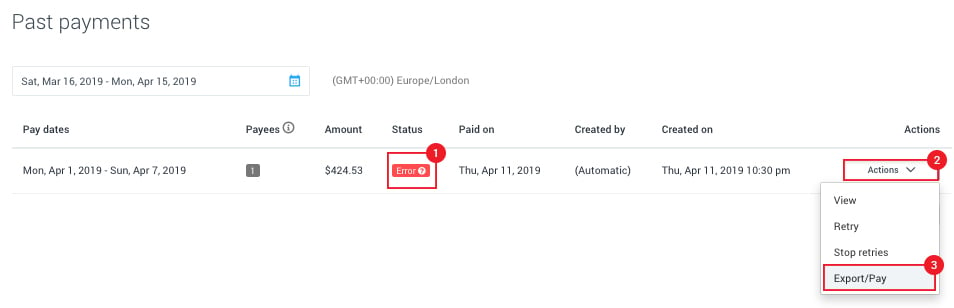
Look at the failed payment and click on the Action button, then click on Export/Pay.
Step 3
Click on the alternate payment gateway you wish to use; in this case, we will use Wise as an example.
You will need to have the payment method previously set up as a payroll account. Here are guides that will take you through that process:
- Add Wise payment account
- Add Payoneer payment account
- Add Bitwage payment account
- Add PayPal payment account
- Add Gusto payment account
Then click on Send payment.
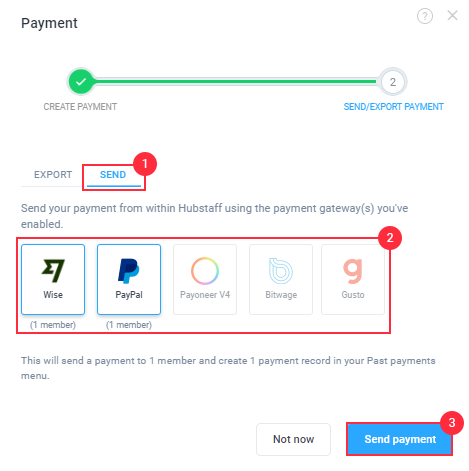
The system will automatically split the team payment, moving the users to a new team payment and automatically paying the new payment via the new gateway. If the payment fails, follow the steps again to select a new gateway. Note that you cannot pay from one gateway to another (example: Wise to PayPal), you can only pay from a gateway to the same gateway (Example: Wise to Wise).