Hubstaff’s Insights add-on includes automatic unusual activity detection and logging. When Hubstaff Insights is active for your organization, organization owners and managers are both informed, through the unusual activity widget, and notified through email about users employing software that mimics keyboard/mouse movements to produce simulated activity.
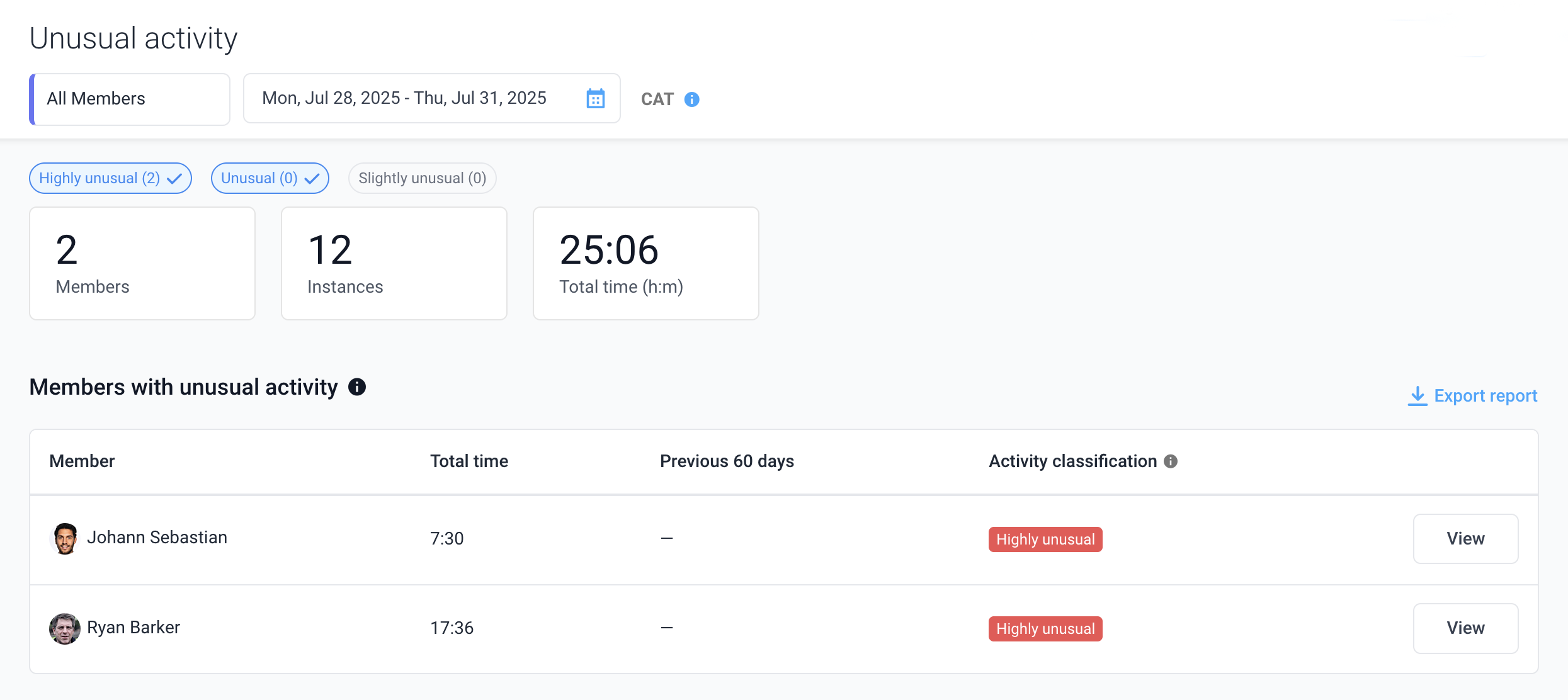
- Instance is an individual time period where unusual activity is found.
- Total time is the length of all instances, combined.
- Activity classification is assigned to each instance and member based on its deviation from average work metrics. These scores help managers prioritize investigations.
Unusual activity is calculated the next day up to 36 hours from the specific date.
Unusual activity types
Suspicious application detection
Description: Hubstaff maintains a list of applications known to simulate keyboard and/or mouse activity to mimic work. While time tracking, Hubstaff monitors for these time fraud applications running on the device.
Real-world example: An employee installs software designed to mimic active computer use while they are away, which is flagged by Hubstaff monitoring tools. The name of the known time fraud application and the date/time it was used are logged and available within the Unusual Activity page in Hubstaff.
How often suspicious applications are detected: Time fraud applications are infrequently detected, but pose a significant concern when identified. Be sure to check other unusual activity trends and that the member does not already have permission to use such an application in their use case.
Unusually high activity
Description: Unusually high activity is recorded when a member’s average activity level stays at 95% or higher for 30 minutes or more. While such activity can occur occasionally during focused work, it is rare, especially beyond 60 minutes.
Real-world example: A software developer is debugging complex code and continuously types and navigates tools while moving their keyboard and/or mouse for over 95% (not moving the keyboard or mouse for 5%) of 35 minutes.
How often unusually high activity is detected: While it is rare, some members working normally will exceed a 95% activity level for 30-60 minutes. Members exceeding 95% activity for over 60 minutes, however, is extremely rare.
Unusually consistent activity
Description: Unusually consistent activity is recorded when a member’s average activity rate (across all input devices combined) fluctuates by 4% or less for 90 minutes or more. Or fluctuates by 0% for 40 minutes or more.
Real-world example: A virtual assistant is working on an email campaign and manages to use their mouse and/or keyboard between 60% and 63% of the time (37-40% not moving) for 93 consecutive minutes.
How often unusually consistent activity is detected: Keeping activity levels very consistent (within 4% change) for more than 90 minutes is rare while working normally, though it can occur. Keeping activity levels exactly consistent with a 0% change in activity levels for 40 minutes or more is exceedingly rare and should be investigated immediately.
Predominantly mouse usage
Description: While the mouse was being used normally, the keyboard stayed at or near 0% for over 50 minutes.
Real-world example: A product designer uses only their mouse while designing a new feature for 58 consecutive minutes.
How often is predominantly mouse usage detected?
Little to no keyboard movement while the mouse is still moving for over 50 minutes can occur while working normally. For example, when in a meeting, a member may only use their mouse while presenting. Still, this can be a common sign of time fraud or low engagement and should be investigated.
Predominantly keyboard usage
Description: While the keyboard was being used normally, the mouse stayed at or near 0% for over 50 minutes
Real world example: A writer uses only their keyboard while constructing a new blog article for 53 consecutive minutes.
How often is predominantly keyboard usage detected? Little to no mouse movement while the keyboard is still in use for over 50 minutes can occur while working normally. For example, when in a meeting, a member may only use their keyboard while presenting. Still, this can be a common sign of time fraud or low engagement and should be investigated.
Sustained high focus time
Description: During a single day, the member had over 5 hours of focus time above 80%
Real-world example: A virtual assistant is proofreading and editing a presentation all day within PowerPoint, an application that is set as productive for this individual. They do not switch to any other unproductive or communication tool during this time. Their focus time for the day ends up at over 6 hours.
How often sustained high focus time is detected: Though it may be odd for some job types, others may have days where focus time exceeds 5 hours per day. This unusual activity type will only display if a member also has another unusual activity on the same day, and should be investigated using a variety of work time data.
Breakless work
Description: Breakless work is logged when a member tracks time for over 5 consecutive hours without stopping their Hubstaff timer, AND their activity never drops below 30%.
Real-world example: A software engineer troubleshooting a critical system outage works continuously, moving their keyboard and/or mouse over 30% of the time for five consecutive hours to resolve the issue.
How often sustained high focus time is detected: Though it may be odd for some job types, others may regularly be moving input devices without a break for over 5 hours. This unusual activity type will only display if a member also has another unusual activity on the same day, and should be investigated using a variety of work time data.
Activity classification
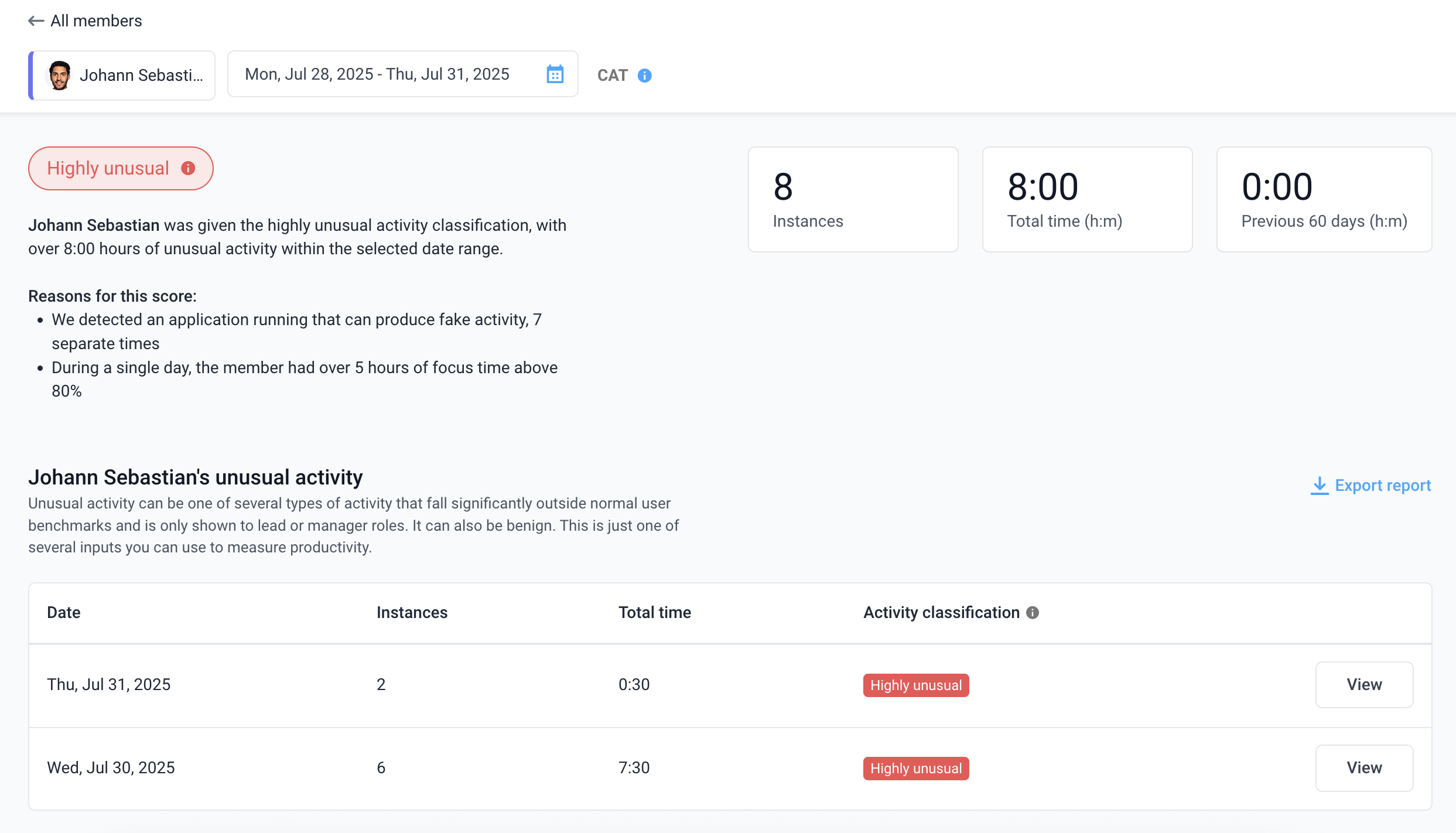
Please note – Hubstaff’s unusual activity feature is not exclusively a cheating detection system. Instead, it automatically flags activity that deviates significantly from normal work patterns. Some flagged instances might indicate time fraud, while others could simply reflect legitimate work that falls outside typical metrics.
- Instances are the number of individual instances found within the date range selected.
- Total time is the aggregate of all instance durations.
- Previous 60 days is the aggregate of all instance durations found, 60 days before the date range selected.
- Reasons for this score is a section that breaks down the main reasons why the individual was given the confidence score for the date range selected.
- Selecting View more under Reasons for this score will bring up a full list of reasons with direct links to investigate each instance.
Each flagged instance is assigned an activity classification based on its deviation from average work metrics. These scores help managers prioritize investigations:
- Highly unusual: The activity is likely to involve time fraud based on its rarity or the observed metrics, though a further investigation will be necessary to be sure.
- Unusual: The activity may involve time fraud, warranting further investigation of the associated metrics.
- Slightly unusual: The activity could be time fraud or normal work. We recommend reviewing its frequency and other relevant metrics for a clearer assessment.
Selecting a day with unusual activity will pull up all instances found on that day, along with activity data/screenshots that correspond to the flagged unusual activity, as shown here:
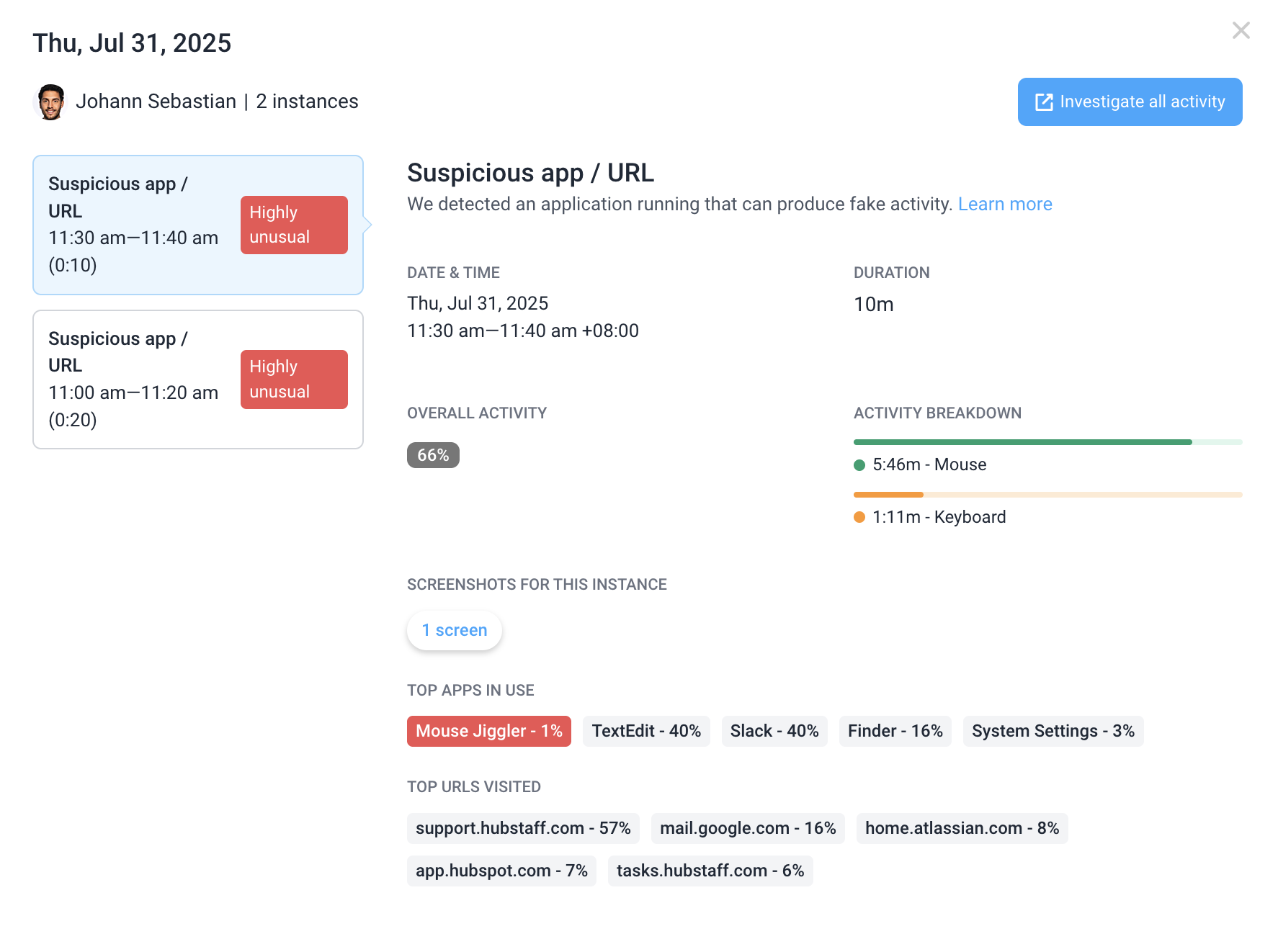
- Overall activity is the % of time the mouse and/or keyboard were moving during the time frame in question.
- Activity breakdown is the total amount of time the mouse and keyboard were moving during the time frame in question.
- Screenshots for this instance will open if they were taken and you have permission to view them; they will appear within the unusual activity page.
- Top apps and URLs refer to the most frequently used apps and URLs within the specified time frame.
- Investigate all activity button will open a new browser tab and navigate to the Activity > Screenshots page for the member+day in question.